
 Stops
How to find where the weather is best for a day out
Deciding between the lake, the hills and the beach for Saturday usually means checking the forecast for each one in turn. Stops lines them up for you: pick the day, and your places nearby come best weather first.
- Stops Pro
- A few seconds
- iPhone and iPad
What you need
- Location access for Stops, so it knows what’s nearby.
- Stops Pro.
Step by step
-
Open Where to Go
On the Stops tab, tap the weather button at the top, next to the filter and search buttons.
The Journal also opens with a Where to Go row: cards for the places worth a trip in the next few days, weighing the weather with how near each is, places you keep going back to, and places you’ve saved but not been to yet. Each card shows its distance, why it’s there and today’s forecast, or tomorrow’s late in the evening. Tap See All for the full list.
-
Pick the day and how far to go
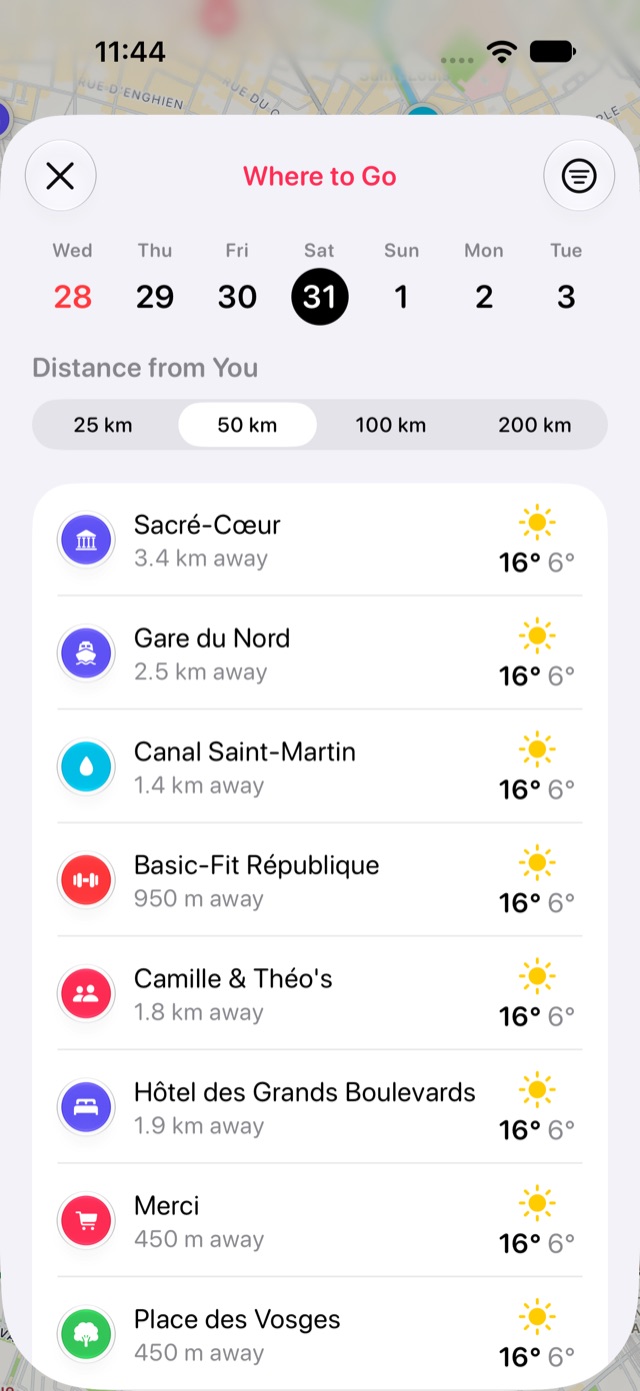
Tap a day in the week at the top: it starts on the coming Saturday. Then choose how far from you to look, from 25 to 200 km. To see only some kinds of place, such as beaches or hikes, tap the filter button and tick their categories. Stops remembers the distance and the filter for next time.
-
Choose your spot
Your stops within that distance are listed best weather first, each with the day’s forecast. Tap one to open it and get directions.
Good to know
- A dry, clear, mild day comes first; rain, storms and very hot or cold days move a place down.
- Forecasts come from Apple Weather.
More guides
Get Stops
Save the places you’ll come back to, on iPhone, iPad, Mac and Apple Watch.
